Wireless Security Cameras vs. Wired: Which Is Better?
Choosing between wireless security cameras and wired cameras is one of the first decisions you will make when protecting your home or business. Both can deliver sharp video and real peace of mind. But they work very differently, and the wrong choice can mean dropped footage, dead batteries, or paying for a system you outgrow in a year.
This guide breaks down how each type works, where each one wins, and how to decide. We will also clear up the most common mix-up in the industry: wireless vs. wire-free cameras. By the end, you will know which setup fits your property, your budget, and the way you actually use your cameras.
Wireless vs. Wired Cameras at a Glance
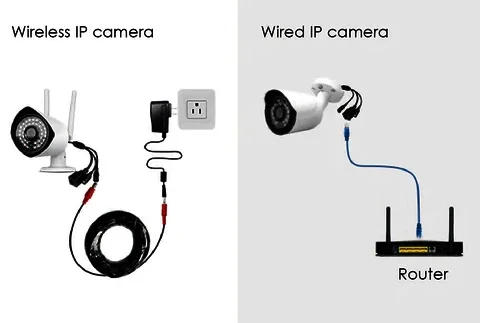
Here is the short version before we dig into the details.
Factor
Wireless Cameras
Wired (PoE) Cameras
How video travels
Over WiFi or a wireless bridge
Over an Ethernet cable
Power source
Outlet, battery, or solar
The same Ethernet cable (PoE)
Installation
Faster, little or no drilling
More labor, cable runs through walls
Reliability
Depends on WiFi signal strength
Very stable, no interference
Video quality
Good to excellent, limited by bandwidth
Excellent, supports 4K and many cameras
Best for
Renters, small homes, hard-to-wire spots
Larger homes, businesses, 24/7 recording
Flexibility
Easy to move or add
Fixed once installed
What Are Wireless Security Cameras?
Wireless security cameras send video to your phone, cloud storage, or a recorder over a wireless signal instead of a data cable. Most connect to your home WiFi network. Some commercial systems use a dedicated wireless bridge or long-range antenna to beam video across a parking lot, barn, or dock where running cable is impractical.
A typical wireless camera with WiFi lets you open an app, see a live view, get motion alerts, and talk through a built-in speaker. Many store clips on a microSD card, in the cloud, or both.
What Is a Wireless IP Security Camera?
A wireless IP security camera is a network camera with its own IP address that joins your WiFi network like a laptop or smart TV. Because it is a true network device, it can usually record to a network video recorder (NVR), work with professional viewing software, and integrate with other smart devices. Consumer “app-only” cameras, by contrast, often lock you into one brand’s app and subscription.
Wireless vs. Wire-Free Cameras: Know the Difference
This is where many buyers get confused. “Wireless” and “wire-free” are not the same thing.
Wireless cameras send video wirelessly but still need power from a nearby outlet or a low-voltage power cable.
Wire-free cameras are fully cordless. They run on rechargeable batteries or a small solar panel and send video over WiFi.
Wire-free cameras are the easiest to mount, but batteries mean trade-offs. To save power, most only record when they detect motion, and they can miss the first second or two of an event. Hot Texas summers also shorten battery life. Plug-in wireless cameras can record continuously and never need a recharge, which makes them the better choice for key entry points.
What Are Wired Security Cameras?
Most modern wired systems use Power over Ethernet (PoE). One Ethernet cable carries both power and video from each camera to an NVR, which records everything on a hard drive. Older analog CCTV systems use coaxial cable and a separate power line, but PoE has largely replaced them in new installs.
Because nothing travels over the air, wired cameras are not affected by WiFi dead zones, neighbors’ networks, or a router that needs a reboot. You get steady, high-resolution recording around the clock.
Pros and Cons of Wireless Security Cameras
Advantages
Faster, cleaner installation. No cables through attics or walls, so most cameras go up in less time.
Flexible placement. Easy to move, add, or reposition as your needs change.
Great for hard-to-wire spots. Detached garages, gates, sheds, docks, and rental properties.
Renter friendly. Little or no drilling, and you can take the cameras with you.
Solar and long-range options. Perfect for ranch land, job sites, and remote buildings with no power.
Disadvantages
Depends on WiFi strength. Weak signal means lag, pixelated video, or dropped recording.
Bandwidth limits. Several 4K cameras on one home network can slow everything down.
Battery upkeep for wire-free models. Recharging or replacing batteries every few weeks or months.
Interference. Thick stucco, brick, metal siding, and crowded WiFi channels can weaken the signal.
Security hygiene matters more. Default passwords and outdated firmware can expose cameras on your network.
Pros and Cons of Wired Security Cameras
Advantages
Rock-solid reliability. No signal drops, which is why most businesses choose wired.
Highest video quality. Easily supports 4K, wide dynamic range, and many cameras at once.
Continuous 24/7 recording. Every second is saved to the NVR, not just motion clips.
One cable does it all. PoE delivers power and data, and a battery backup on the NVR keeps it running in an outage.
Harder to tamper with. No wireless signal to jam or intercept.
Disadvantages
More involved installation. Cable runs through walls, attics, and soffits take skill and time.
Higher upfront cost. More labor and materials than a basic wireless setup.
Less flexible. Moving a camera later means running new cable.
Which Is Better for Your Property?
There is no single winner. The right choice depends on your building, your goals, and how much footage you need to keep.
Choose Wireless Security Cameras If You:
Rent your home or plan to move soon
Need coverage on a detached garage, gate, dock, or outbuilding
Want a fast install with minimal drilling
Have strong, reliable WiFi where cameras will go
Need cameras on remote land with no power, using solar
Choose Wired Cameras If You:
Own a larger home or a commercial property
Need continuous recording for insurance, liability, or employee safety
Want 4K video from eight or more cameras
Have spots where WiFi is weak or unreliable
Are building, remodeling, or already opening walls
The Hybrid Option
Many of our customers end up with both. Wired PoE cameras cover the main entrances, driveway, and storefront, while wireless cameras fill gaps at a pool house, side gate, or boat dock. Most professional NVRs can record wired and wireless IP cameras side by side, so everything lives in one app.
What Coastal Bend Property Owners Should Consider
Living near the Gulf brings a few extra factors that national buying guides rarely mention.
Salt air and humidity. Choose cameras with an IP66 or IP67 weather rating and sealed, corrosion-resistant connections. Cheap housings and exposed connectors fail fast on the coast.
Heat and sun. Summer heat drains batteries and can shut down budget cameras. Look for a wide operating temperature range and mount cameras under eaves when possible.
Storms and power outages. Wire-free cameras keep running when power goes out, but your WiFi router may not. Pair any system with a battery backup (UPS) for the router or NVR so cameras keep recording during a storm.
Large lots and waterfront property. Docks, boat lifts, and back acreage are often too far for home WiFi. Long-range wireless antennas or solar cameras solve this without trenching.
Wireless Camera Installation: DIY or Professional?
Wireless camera installation looks simple on the box, and for a single doorbell camera it often is. Problems start when you add several cameras to a large property. The most common issues we fix are weak signal at the mounting spot, cameras on a crowded WiFi channel, wrong angles that miss faces, and devices still using factory passwords.
How to Set Up a Wireless Camera with WiFi the Right Way
Whether you install it yourself or hire a pro, these steps make a big difference:
Test the signal before you drill. Stand at the planned mounting spot with your phone and check WiFi strength. If it is weak, add a mesh node or access point first.
Use the right band. Many cameras need the 2.4 GHz band, which reaches farther through walls. Give it its own network name if your router allows it.
Separate your cameras. Put cameras on a guest or IoT network so they are isolated from your computers and phones.
Change default passwords. Use a strong, unique password and turn on two-factor login in the app.
Update firmware. Install updates during setup and turn on automatic updates.
Set a reserved IP address. For a wireless IP security camera that records to an NVR, a DHCP reservation in your router keeps the connection stable.
Aim for faces and plates. Mount cameras 8 to 10 feet high, angled down at entry points, not just wide yard shots.
Check night vision and alerts. Review footage after dark and fine-tune motion zones so you are not flooded with false alerts.
A professional installer handles signal mapping, weatherproof mounting, network security, and recorder setup in one visit. If you want it done right the first time, our Wireless Security Camera installation service covers everything from site survey to app setup.
Cost: Wireless vs. Wired Security Cameras
Wireless cameras usually cost less to install because there is little to no cable labor. Wired systems cost more upfront due to cable runs and the NVR, but they often cost less over time since there are no batteries to replace and fewer cloud subscription fees when footage records locally.
Your total price depends on the number of cameras, resolution, storage method, mounting height, and how hard the cable paths are. The best way to compare is a free on-site estimate that prices both options for your actual property.
How Cameras Fit Into a Complete Security Plan
Cameras show you what happened. A full security system helps stop it from happening. Pairing cameras with door and window sensors, motion detectors, smart locks, and 24/7 professional monitoring means alerts go to people who can dispatch help, not just to your phone while you are asleep or at work.
If you are weighing the bigger picture, our guide to smart Home Security Systems explains how cameras, sensors, and monitoring work together.
Frequently Asked Questions About Wireless Security Cameras
Do wireless security cameras work without internet?
Many do. Cameras that record to a local microSD card or an NVR keep recording without internet. You just cannot view them remotely or get phone alerts until the connection returns. Some professional systems also let you view live video on-site with no internet at all.
Can wireless security cameras be hacked?
Any connected device can be targeted, but the risk is low with good habits. Change default passwords, use WPA2 or WPA3 WiFi encryption, enable two-factor login, keep firmware updated, and keep cameras on a separate network.
How far can a wireless camera be from the router?
It depends on walls, building materials, and interference. Indoors, many cameras work well within roughly 100 to 150 feet with few obstructions, but brick, stucco, and metal cut that sharply. Mesh WiFi, outdoor access points, or point-to-point antennas extend range much further.
How long do wire-free camera batteries last?
Typically from a few weeks to several months, depending on motion activity, video settings, and temperature. Busy driveways and hot weather drain batteries faster. A small solar panel can keep many models charged.
Are wired cameras better for businesses?
In most cases, yes. Businesses usually need continuous recording, many cameras, and dependable footage for insurance or legal records, which is where wired PoE systems shine. Wireless cameras still work well for parking areas, gates, and outbuildings that are hard to wire.
The Verdict: Wireless or Wired?
Wireless security cameras win on convenience, flexibility, and fast installation. Wired cameras win on reliability, video quality, and round-the-clock recording. For most homeowners, a few well-placed wireless cameras on strong WiFi are a smart start. For businesses, larger homes, and anyone who cannot afford a gap in footage, wired PoE is the stronger foundation, often with wireless cameras filling the hard-to-reach spots.
The best system is the one designed around your property, not the one on sale at the big-box store. Red Alarm has helped homes and businesses across the Coastal Bend choose the right mix for more than 20 years. Explore our Security Cameras in Corpus Christi, TX to see how we can help.
Ready to protect what matters most? Call Red Alarm today at (361) 906-8803 for a free security camera estimate. We are open daily from 8am to 10pm.
About Red Alarm
Red Alarm is a licensed Texas security company (License #B10443401) serving Corpus Christi, Portland, Aransas Pass, Port Aransas, Rockport, Kingsville, Victoria, and surrounding areas. For more than 20 years, our team has installed wired and wireless security cameras, alarm systems, access control, and smart home technology for homeowners and businesses. We focus on clean installations, clear explanations, and systems built to handle the Gulf Coast climate.