How Do Wireless Alarm Systems Work? A Complete Security Guide
A wireless alarm system protects your home or business without running cable to every door, window, and hallway. Small battery-powered sensors talk to a central control panel by radio, and the panel calls for help the moment something is wrong. It sounds simple, and for the person using it every day, it is. But what happens in the few seconds between a door opening and a monitoring operator picking up the phone is worth understanding before you buy.
This guide explains exactly how a wireless alarm system works, piece by piece. You will learn what each component does, how signals travel, what keeps the system running during a power or internet outage, and how wireless compares with a wired alarm system. We will also cover installation, costs, and the everyday habits that keep false alarms away.
What Is a Wireless Alarm System?
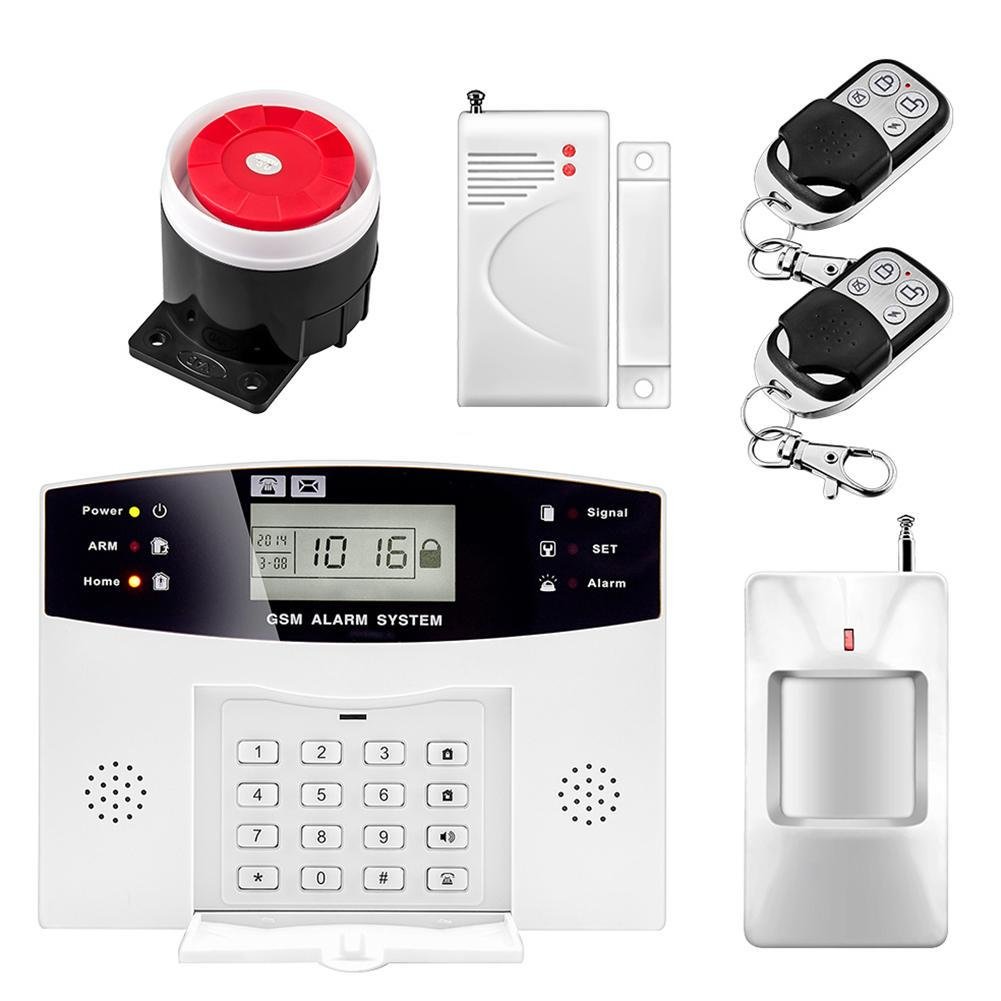
A wireless alarm system is a security system in which the sensors, keypads, and sirens communicate with the control panel over radio frequency (RF) signals instead of copper wire. The panel then reports alarms to you and to a monitoring center over a cellular or internet connection.
“Wireless” usually describes two different links, and good systems use wireless technology for both:
Inside the property: sensors send signals to the panel over the air.
Outside the property: the panel sends alarms to the monitoring station by cellular radio, often with Wi-Fi or Ethernet as a backup, instead of a landline.
Most modern systems are still plugged into an outlet for main power. “Wireless” means the security devices are free of data wiring, not that nothing in the house has a cord.
The Main Parts of a Wireless Alarm System
Every wireless alarm home security setup is built from the same core parts. How well they are chosen and placed decides how well the system performs.
The Control Panel (the Brain)
The control panel receives every sensor signal, decides whether it matters based on how the system is armed, and sends the alarm out. Today most panels are touchscreen units that also act as the keypad and the smart home hub. Inside is a backup battery, a cellular communicator, and a radio receiver tuned to the sensors it supports.
Door and Window Contact Sensors
These two-piece sensors use a magnet and a reed switch. When a door or window opens, the magnet moves away, the switch changes state, and the sensor transmits a signal. They are the foundation of any burglar security alarm system because most break-ins start at a door or ground-floor window.
Motion Detectors
Passive infrared (PIR) motion detectors sense the body heat of a person moving across the room. Pet-immune models ignore animals up to a set weight, which matters for families with dogs or cats. Motion sensors are a second layer that catches an intruder who gets past a door or window.
Glass Break Sensors
A glass break sensor listens for the specific sound pattern of breaking glass. One sensor can cover several windows in the same room, which makes it a cost-effective way to protect large panes and sliding doors.
Environmental and Life Safety Sensors
Wireless smoke, heat, carbon monoxide, flood, and freeze sensors turn an alarm into a full protection system. A monitored smoke detector can bring the fire department even when no one is home.
Keypads, Key Fobs, and the Mobile App
Secondary keypads by the garage or back door, wireless key fobs, and smartphone apps let you arm and disarm without walking to the main panel. The app also sends real-time alerts, so you know when a door opens or a sensor battery runs low.
Sirens and Indoor Strobes
A loud siren tells an intruder they have been detected and alerts the people inside. Many wireless systems add an extra siren upstairs or in a detached garage so the alarm can be heard everywhere.
How a Wireless Alarm System Works, Step by Step
Here is what happens from the moment a sensor trips to the moment help is on the way.
A sensor detects an event. A door opens, motion crosses a room, or glass breaks.
The sensor transmits an encrypted signal. It sends a short radio burst that identifies which sensor it is and what happened. Each sensor is assigned to a “zone,” so the panel knows the event was the back door, not the front.
The panel checks the arming mode. If the system is disarmed, it may just chime. If it is armed, the panel starts an entry delay (usually 30 to 60 seconds) for entry doors, or sounds the alarm right away for interior and perimeter zones.
The siren sounds and alerts go out. If no valid code is entered in time, the siren activates and the panel sends an alarm message.
The monitoring center receives the signal. The alarm travels over the cellular network (and Wi-Fi as a backup) to a 24/7 central station, where an operator sees the address, the zone, and the event type within seconds.
The operator verifies and dispatches. The operator calls you or your listed contacts. If the alarm is real or no one answers, they send police, fire, or medical help.
Behind the scenes, the panel is also checking on every device. Each sensor sends a regular “supervision” signal. If one stops checking in because of a dead battery, damage, or tampering, the panel flags it as a trouble condition and notifies you.
How Wireless Sensors Communicate With the Panel
This is the part most buying guides skip, and it is why some wireless systems feel rock solid while others drop sensors.
Radio Frequencies and Range
Alarm sensors transmit on frequencies set aside for security devices, commonly in the 300 to 900 MHz range. These lower frequencies pass through walls and floors better than Wi-Fi. A typical sensor reaches the panel from 100 to 300 feet indoors, while newer long-range, frequency-hopping technologies can reach much farther in open air. Brick, stucco with metal lath, mirrors, large appliances, and metal buildings all shorten that range.
Encryption and Jamming Protection
Older wireless sensors sent simple, unencrypted signals. Current professional-grade sensors use encryption and two-way communication, so the panel confirms it received each message. Many panels also include RF jam detection. If someone tries to drown out sensor signals with radio noise, the panel recognizes the pattern and can treat it as a trouble or alarm event.
Panel-to-Monitoring Communication
Landline alarms can be stopped by cutting the phone line outside the house. A cellular communicator removes that weak point. Systems with “dual-path” communication send alarms over both cellular and the internet, so if one path fails, the other still gets through.
What Happens During a Power or Internet Outage?
A well-designed wireless alarm system keeps working when the lights go out, which matters during Gulf Coast storms and summer grid strain.
Sensors run on their own batteries. Most lithium sensor batteries last three to five years and are not affected by a power outage.
The panel switches to its backup battery. Most panels run for roughly 24 hours on backup, depending on the model and features in use.
Cellular keeps alarms flowing. If your internet router loses power, a cellular communicator still reaches the monitoring station.
To get the most from your system in long outages, ask your installer about a larger backup battery and keep Wi-Fi equipment on a battery backup (UPS) if you rely on cameras.
Wireless Alarm System vs. Wired Alarm System
Choosing between a wireless and wired alarm system depends on your property's layout, installation requirements, and security needs. Both options provide reliable protection, but each has different advantages.
Wireless Alarm System
Wireless alarm systems use radio signals to connect sensors to the main control panel instead of physical cables.
Easy Installation: Quick installation with minimal drilling or wiring.
Battery-Powered Sensors: Sensors typically use long-life batteries that last 3–5 years.
Reliable Performance: Modern encrypted sensors provide dependable security with proper placement.
Flexible Setup: Easily add, move, or relocate sensors as needed.
Lower Installation Costs: Typically requires less labor and installation work.
Best For: Existing homes, rental properties, smart homes, and quick installations.
When a Wireless System Makes More Sense
Choose wireless if you live in a finished home, rent, want installation done in a day, or plan to add smart home features later. It is also the easier choice for detached garages, shops, and outbuildings.
When a Wired System Makes More Sense
A wired alarm system is a strong fit for new construction where walls are open, large commercial buildings with many zones, and metal structures that block radio signals.
The Hybrid Option
If your home already has a working wired alarm system, you do not have to start over. Many modern panels accept a “takeover” module that keeps existing wired sensors working while adding wireless sensors, cellular monitoring, and app control.
Is a Wireless Alarm System Secure Enough for Burglary Protection?
Yes, when it is professionally designed. A burglar security alarm system works best in layers: perimeter sensors on every accessible door and window, motion detection in main traffic areas, and glass break sensors where large windows are an easy target. Add visible yard signs and window decals, because a clearly protected home is less appealing to a burglar in the first place.
Cameras add proof and a live view. Pairing your alarm with Wireless Security Camera Installation lets you check what triggered an alert from your phone in seconds, and lets monitoring operators verify an alarm before dispatch.
Smart Home Features of Wireless Alarm Home Security
Modern wireless alarm home security panels double as a smart home hub. Common add-ons include:
Smart door locks that lock automatically when you arm the system
Smart thermostats that adjust when the house is empty
Lights that turn on when an alarm sounds
Garage door controllers you can close from anywhere
Video doorbells that show you who is at the door before you open it
All of it runs from one app, so arming the system at night can lock the doors, close the garage, and turn off the lights in one tap.
Wireless Alarm System Installation: DIY or Professional?
DIY kits are easy to buy, but most problems with wireless systems come from poor design, not bad equipment. Sensors placed too far from the panel, motion detectors aimed at a heat vent, or a panel hidden in a metal cabinet all lead to dropped signals and false alarms.
A professional installer will:
Walk the property to find every entry point and weak spot
Test signal strength at each sensor location before mounting
Choose sensors and placement that reduce false alarms
Program zones, entry delays, and user codes correctly
Set up monitoring, the app, and smart home devices
Show your family how to use the system
If you are in Central Texas, our Alarm Installation in Austin TX guide walks through what a professional install looks like from start to finish.
How Much Does a Wireless Alarm System Cost?
Pricing depends on property size, the number of sensors, and the features you want. As a general range:
Equipment: a few hundred dollars for a basic package to well over $1,000 for larger homes with many sensors and smart devices
Professional installation: often included or modest for wireless systems because there is little cable labor
Professional monitoring: commonly about $20 to $60 per month, depending on cellular service, video, and smart home features
Ask about insurance savings too. Many insurers offer a discount for a professionally monitored alarm system, so check with your agent. The most accurate way to price your system is an on-site estimate.
Tips to Keep Your Wireless Alarm System Working Well
Test monthly. Put the system in test mode and open a few doors to confirm signals reach the panel and the monitoring center.
Replace batteries when prompted. Do not ignore low-battery alerts.
Keep your contact list current. Operators can only reach you at numbers on file.
Use unique user codes. Give each family member or employee their own code and remove old ones.
Reduce false alarms. Lock doors and windows before arming, and keep balloons, curtains, and ceiling fans out of motion sensor view.
Check local rules. Many Texas cities require an alarm permit and charge fees for repeated false alarms, so register your system with your city if required.
Frequently Asked Questions About Wireless Alarm Systems
Do wireless alarm systems need Wi-Fi?
No. Most professional systems use a cellular connection to reach the monitoring center, so they work without Wi-Fi. Wi-Fi adds a backup path and powers features like video and app updates.
Can a wireless alarm system be hacked or jammed?
Any connected device can be targeted, but modern encrypted sensors, RF jam detection, and cellular communication make it very difficult. Strong user codes and a secure app login close the remaining gaps.
How long do wireless sensor batteries last?
Most last three to five years. The panel alerts you when a battery is low, usually weeks before it fails.
Does a wireless alarm system work when the power goes out?
Yes. Sensors run on their own batteries, the panel switches to its backup battery, and cellular communication keeps alarms reaching the monitoring center.
Is a wireless or wired alarm system better?
Neither is better for everyone. Wireless is faster to install and easier to expand. A wired alarm system suits new construction and large commercial sites. Many properties do well with a hybrid of both.
Can I take my wireless alarm system with me if I move?
Often, yes. Wireless sensors and panels can usually be removed and reinstalled in a new home, although monitoring contracts and equipment ownership terms vary by provider.
Protect Your Property With a Professionally Installed Wireless Alarm System
A wireless alarm system gives you fast installation, strong protection, round-the-clock monitoring, and smart home control from your phone. The difference between a system that simply works and one that protects you well comes down to the design and installation behind it.
Red Alarm designs and installs alarm systems, cameras, and access control for homes and businesses across the Coastal Bend. Whether you need a new wireless system, an upgrade to an old wired panel, or Business Security Cameras in Corpus Christi, TX our licensed team will build a system around your property and your budget.